

Overview
ChatAndBuild’s Figma integration bridges the gap between design and development by automatically converting Figma designs into functional code. Import designs, generate components, and maintain design-to-code consistency with AI assistance.Features
Design Import
Import Figma frames, components, and entire design files directly into ChatAndBuild.
Code Generation
Generate React, Vue, or HTML components from Figma designs with pixel-perfect accuracy.
Asset Export
Automatically export and optimize images, icons, and other assets from your designs.
Design System Sync
Maintain consistency between Figma design systems and code component libraries.
Setting Up Figma Integration
Connect Your Figma Account
1
Navigate to Integrations
Go to Settings > Connect Apps > Figma Connection and click “Connect”.
2
Authorize Access
Sign in to Figma and authorize ChatAndBuild to access your files.
Design Import Workflow
Import specific design frames: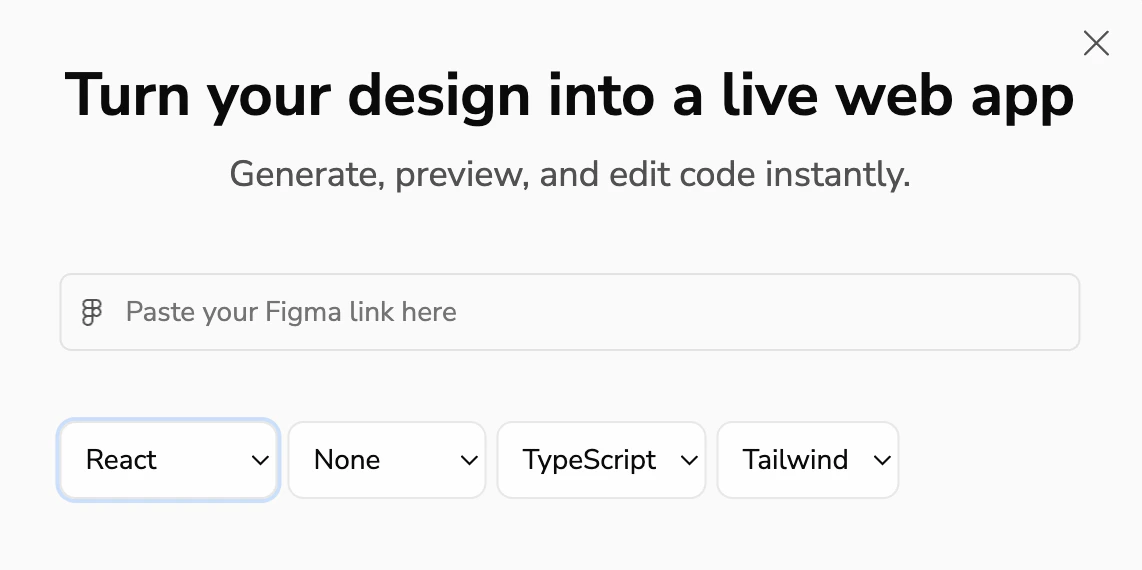
- Select Framework: React of HTML
- Select UI Library: None or Shadcn
- Language: TypeScript or JavaScript
- Styling: CSS or Tailwind
Looking for database integration? Check out our Supabase Integration guide, or return to GitHub Integration for version control.