> ## Documentation Index
> Fetch the complete documentation index at: https://docs.chatandbuild.com/llms.txt
> Use this file to discover all available pages before exploring further.
# Figma Integration
> Convert Figma designs to code with AI-powered design-to-code generation
## Overview
ChatAndBuild's Figma integration bridges the gap between design and development by automatically converting Figma designs into functional code. Import designs, generate components, and maintain design-to-code consistency with AI assistance.
## Features
Import Figma frames, components, and entire design files directly into ChatAndBuild.
Generate React, Vue, or HTML components from Figma designs with pixel-perfect accuracy.
Automatically export and optimize images, icons, and other assets from your designs.
Maintain consistency between Figma design systems and code component libraries.
## Setting Up Figma Integration
### Connect Your Figma Account
Go to Settings > Connect Apps > Figma Connection and click "Connect".
Sign in to Figma and authorize ChatAndBuild to access your files.
## Design Import Workflow
**Import specific design frames**:
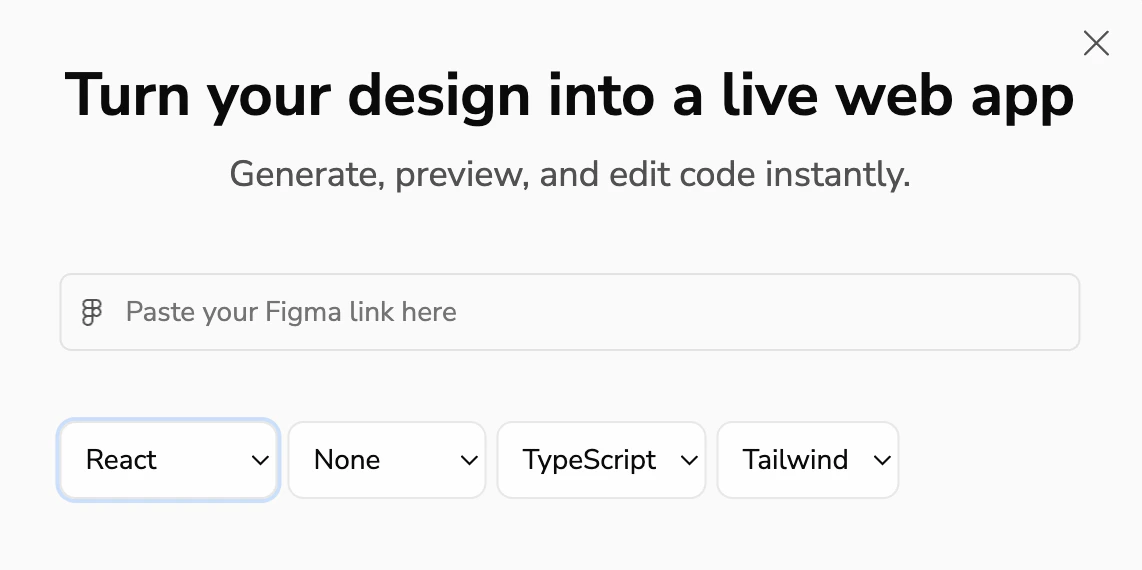 1. **Select Framework**: React of HTML
2. **Select UI Library**: None or Shadcn
3. **Language**: TypeScript or JavaScript
4. **Styling**: CSS or Tailwind
Looking for database integration? Check out our [Supabase Integration](/docs/integrations/supabase) guide, or return to [GitHub Integration](/docs/integrations/github) for version control.
1. **Select Framework**: React of HTML
2. **Select UI Library**: None or Shadcn
3. **Language**: TypeScript or JavaScript
4. **Styling**: CSS or Tailwind
Looking for database integration? Check out our [Supabase Integration](/docs/integrations/supabase) guide, or return to [GitHub Integration](/docs/integrations/github) for version control.